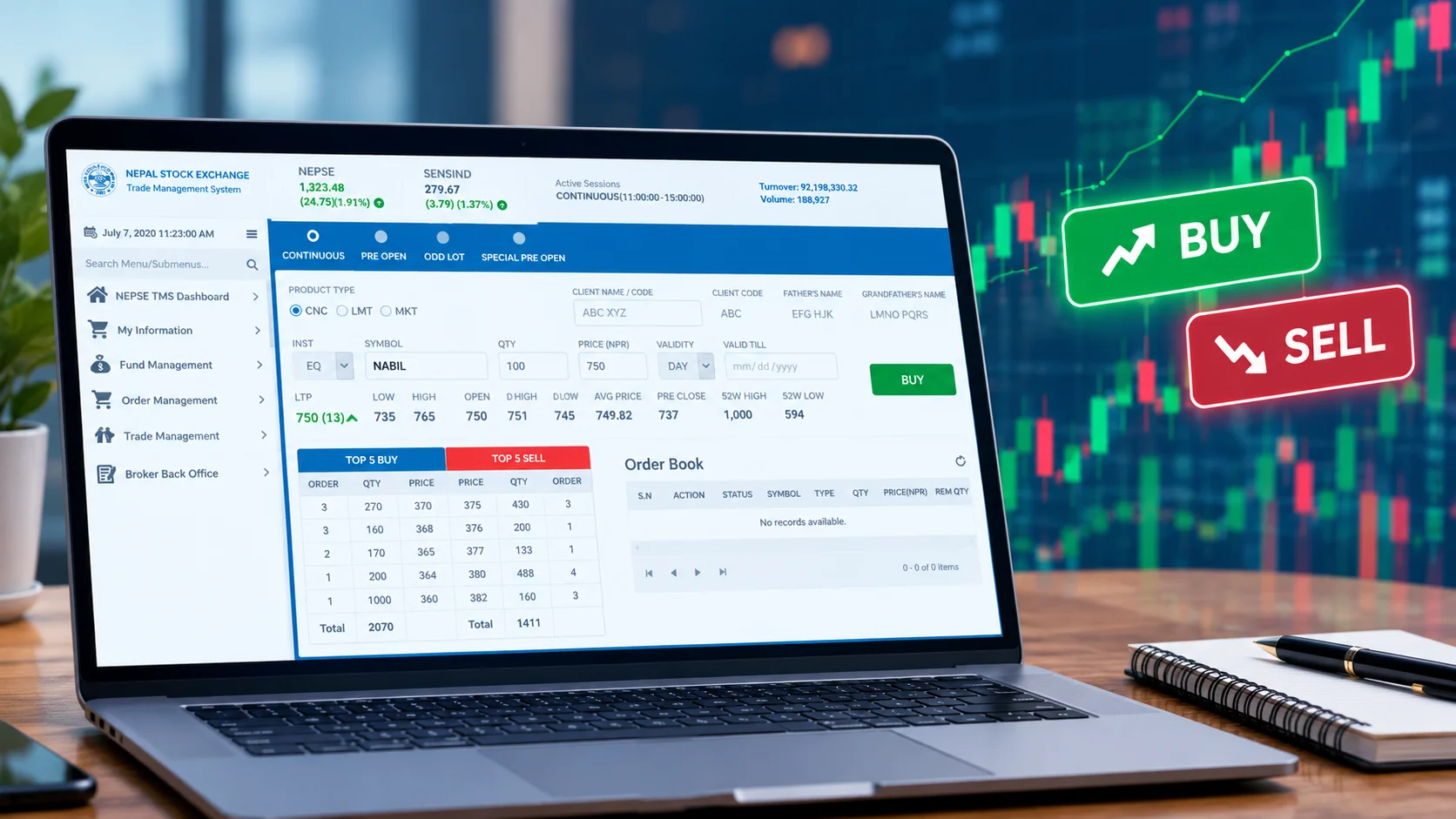
The first time most people learn to place a NEPSE TMS order, they learn it the expensive way. You open your demat, load a few thousand rupees into your broker account, log in, find the stock you have been reading about on investor Facebook groups, and hit buy. The order fills instantly at a price higher than you expected. You just placed a market order into a thin queue and paid whatever the sellers were asking. It is a small loss, but it is the kind of avoidable mistake that the platform quietly lets you make on day one.
Placing a buy or sell order on NEPSE through TMS is not hard. The Trade Management System, the browser platform your broker gives you, is deliberately simple. What trips up new investors is not the clicking. It is the handful of decisions around the click: limit order or market order, what price to set, whether your cash or your shares are actually available, and what the trade really costs once every fee is added. Get those right and the mechanics take about thirty seconds. Get them wrong and you overpay, or worse, you place a sell order that will not settle because you skipped one step in a different app.
This guide walks through the whole thing, buying and selling, with the traps called out where they live.
What TMS is, and the one thing beginners confuse
TMS stands for Trade Management System (some brokers write it as Trading Management System). It is the platform NEPSE runs and your broker gives you access to, used for one job: placing actual buy and sell orders on the secondary market. You reach it through a broker-specific web address, usually in the form tmsXX.nepalstock.com.np, where XX is your broker’s number. Your broker issues your login. There is no separate national TMS you sign up for; you trade through the broker you opened your account with.
Here is the confusion that costs beginners time. TMS is not Meroshare, and Meroshare is not TMS. They are two different systems run by two different institutions for two different purposes. Meroshare, run by CDS and Clearing Limited (CDSC), is where you apply for IPOs, view your holdings, check your weighted average cost, and, critically, authorize the release of your shares when you sell. TMS, run by NEPSE, is where the buying and selling actually happens. You will use both, and you will use them in a specific order when you sell. Mix them up and you will go looking for a buy button in the wrong app.
Before any of this works, you need a demat account and a linked TMS account with a broker. If you have not set those up yet, start there; we cover the full process in our guide to opening a demat and Meroshare account in Nepal. This piece assumes you already have both and money in your broker account.
When you can actually trade
NEPSE runs Monday to Friday, 11:00 AM to 3:00 PM Nepal time. The Saturday-inclusive week is gone; the exchange moved to a Monday to Friday schedule in April 2026, so you now get a clean weekend off. Weekends and public holidays, the market is shut.
There is a pre-open session from 10:30 to 11:00 AM. During pre-open you can enter, change, and cancel orders, but nothing executes. At exactly 11:00 the system runs a single call auction, matches the queued orders, and sets an opening price for each stock. After that, continuous trading runs until 3:00 PM.
The newer wrinkle is that you no longer have to be at your screen during market hours to enter an order. Since August 13, 2026, NEPSE’s TMS accepts After Market Orders (AMO). The AMO window runs from 5:00 PM to 10:00 AM the next day, and it shows up as its own session in the platform. Orders you place there do not execute. They sit in a queue and are sent to the market when the next session opens. This grew out of a wider April 2026 rule change, reported by the Kathmandu Post, that lets investors place orders at any time while keeping execution inside market hours.
Convenient, yes. But treat AMO with some suspicion. An order you queue calmly at 9:00 PM executes the next morning into whatever opening price the auction produces, which can be well away from last night’s close if news broke overnight. The feature removes the friction of being present. It does not remove the risk of being wrong about price. More on that below.
How to place a buy order on TMS, step by step

Buying is the simpler of the two, because your cash already sits with the broker and no share transfer approval is needed on your side.
- Log in to your broker’s TMS at its tmsXX.nepalstock.com.np address using your client code and password.
- Check your buying power. TMS shows your available collateral or balance. You can only place orders up to the cash you have with the broker.
- Open the order entry screen and choose Buy.
- Enter the stock symbol, for example NABIL or NIFRA, the quantity, and the price.
- Choose your order type. This is the decision that matters, and the next section is entirely about it.
- Review and submit. If a matching sell order exists at your price, the trade executes right away. If not, your order joins the buy queue and waits.
That is the whole flow. The stock symbol, quantity, price, submit. The screen will confirm the order and give it a status: fully executed, partially executed, or open (pending).
Limit order or market order: the choice that decides your price

TMS lets you place a limit order or a market order, and for a new investor this is the single most important thing to understand before you touch the buy button.
A limit order sets the exact price you are willing to accept. Buy 50 units of NIFRA at NPR 235, and you will pay no more than NPR 235 a share. If nobody is selling at 235, your order waits until someone is, or until the day ends and it lapses. You give up speed and certainty of execution. In return you get certainty of price, which is the thing worth protecting.
A market order says: fill me now at whatever price is available. In a heavily traded stock with a tight queue, that is fine; the next available price is close to the last one. In a thinly traded stock, it is a trap. Your market order climbs the sell queue, taking each available lot at a higher price until it is filled, and you end up with an average price well above where the stock was quoting. This is exactly the day-one mistake described at the top of this piece.
Our position is plain. As a beginner, default to limit orders, every time. The few seconds of control you gain are worth more than the convenience of an instant fill, and the habit protects you most in precisely the small, illiquid stocks where retail investors do the most damage to themselves. Use a market order only when the stock is very liquid and you have a genuine reason to prioritize speed over price. That is a narrow case, and most retail investors never actually have it.
Price movement is also capped daily. Historically NEPSE has applied a circuit limit of about 10 percent on individual stocks in a single session, and market-wide circuit breakers halt trading after large index swings. In April 2026 SEBON approved a revised framework: in the first two hours (11am to 1pm) a 5 percent index move triggers a 15-minute halt, and in the closing session (1pm to 3pm) an 8 percent swing halts or closes the market, with the regular order price band relaxed to 3 percent. NEPSE said these take effect only once its board issues formal implementation instructions, so confirm the current live thresholds with your broker before you assume a given band. The practical takeaway does not change: you cannot place a buy or sell far outside the day’s allowed range, and the system will reject a price that breaches the band.
How to place a sell order: the extra step that catches everyone

Selling on NEPSE has one more step than buying, and it lives in a different app. This is where new sellers get stuck, so read this part twice.
When you buy, the shares land in your demat account. When you sell, you cannot just hit sell in TMS and walk away. You have to authorize the release of those shares to the buyer, and that authorization happens in Meroshare, not TMS, through something called EDIS (Electronic Delivery Instruction Slip).
The correct order of operations is:
- Place the sell order in TMS. Choose Sell, enter the symbol, quantity, and price, pick a limit order, and submit, exactly as with a buy.
- Once the order executes, log in to Meroshare separately.
- In Meroshare, go to the EDIS or “My WACC / share transfer” area, find the executed sale, and authorize the transfer using your transaction PIN.
If you skip the EDIS step, your trade will not settle, the shares will not reach the buyer, and you can face penalties from your broker for a failed settlement. The sale is not truly done when TMS says “executed.” It is done when you have authorized the transfer in Meroshare. Plenty of first-time sellers place the order, see the confirmation, and assume that is that. It is not.
A sell order is also the point where tax enters. On a profitable sale, the broker withholds capital gains tax at source. For FY2026/27, the Finance Bill 2083 set the equity CGT for individuals at 10 percent for shares held under a year (short-term) and 7.5 percent for shares held a year or more (long-term). The broker deducts this automatically on the gain, calculated against your weighted average cost. The mechanics of that gain calculation, and the holding-period line that decides your rate, are worth understanding before you sell; we lay them out in our guide to capital gains tax on NEPSE.
After you submit: settlement and when your shares or cash arrive
Execution is not the same as settlement. NEPSE and CDSC run a T+2 rolling settlement cycle. If you buy today, the shares are credited to your demat two working days later. If you sell, the money reaches your account on T+2, after the EDIS authorization has gone through. So the “executed” status you see in TMS is a promise, not a completed transfer; the actual movement of shares and cash finishes two working days on.
This is one area where the ground is shifting. A move to T+1 settlement, where everything completes one working day faster, is on SEBON’s reform agenda, and we cover what that changes for your trades in NEPSE’s move to T+1 settlement. Until it is actually live, plan around T+2.
What the trade really costs, and why small orders are a bad idea
Here is the part the how-to videos skip, and the part that should change how you trade. The order itself is free to place, but every executed trade carries a stack of charges, on both the buy and the sell.
Based on the published fee schedule of a SEBON-licensed broker (Crystal Kanchanjungha Securities), the equity brokerage commission is tiered by transaction size: a flat NPR 10 for trades of NPR 2,500 or less, then 0.36 percent up to NPR 50,000, 0.33 percent from there to NPR 5 lakh, 0.31 percent up to NPR 20 lakh, 0.27 percent up to NPR 1 crore, and 0.24 percent above that. On top of the broker commission sit a SEBON regulatory fee of 0.015 percent of the transaction and a DP (depository participant) charge of NPR 25 per stock per day.
That NPR 25 DP charge is flat, and that is the point. It does not care whether you traded NPR 2,000 or NPR 2 lakh of a stock. On a NPR 2,000 buy, the DP fee alone is more than 1 percent of your money before the commission is even added, and you will pay it again on the way out. Trade in tiny amounts and the fixed costs quietly eat a chunk of your capital that no price gain can easily make back.
So the real lesson buried in the order screen is one about size, not clicks. Do not scatter money across many micro-trades. Consolidate into fewer, larger orders so the flat DP charge and minimum commission become a trivial share of each trade. This is not advice to bet big. It is advice to stop bleeding money to fixed fees on trades too small to justify them.
The verdict
Placing a NEPSE TMS order is genuinely easy, and that ease is the danger. The platform will happily let you fire a market order into a thin stock, forget the EDIS step on a sale, or split your capital into fee-heavy micro-trades. None of those are the platform’s fault; they are defaults you have to consciously override.
Three habits cover almost all of it. Use limit orders so you control your price. On a sell, always finish the job in Meroshare with EDIS, because “executed” in TMS is not settled. And size your trades so the flat DP charge and minimum commission stop mattering. Do those three things and the round-the-clock and AMO conveniences become genuinely useful rather than a fast way to make a considered mistake at 9 o’clock at night. Learn the costs first, then the clicks. It is a much cheaper way to start.
This is analysis, not financial advice.
Frequently Asked Questions
1. What is TMS in NEPSE and how does it work?
TMS (Trade Management System) is the platform provided by your broker for placing actual buy and sell orders on the NEPSE secondary market. You log in using the TMS account provided by your broker, select a stock, enter the quantity and price, choose an order type, and submit the order. TMS is different from Meroshare, which is used for managing your demat holdings, IPO applications, and authorizing share transfers through EDIS.
2. How do I buy shares in NEPSE through TMS?
To buy shares through TMS, log in to your broker’s TMS, check your available balance or buying power, select Buy, enter the stock symbol, quantity, and price, choose your order type, and submit the order. If a matching sell order is available at your price, the trade can execute immediately; otherwise, your order remains in the buy queue.
3. What is the difference between a limit order and a market order in NEPSE TMS?
A limit order lets you specify the maximum price you are willing to pay when buying or the minimum price you are willing to accept when selling. A market order tells the system to execute the order at the available market prices. In a thinly traded stock, a market order can be filled at different prices as it moves through the available buy or sell queue, while a limit order gives you control over the price.
4. How do I sell shares in NEPSE through TMS and complete EDIS?
First, place and execute the sell order through TMS. After the sale is executed, log in separately to Meroshare and complete the EDIS process by finding the executed transaction and authorizing the share transfer using your transaction PIN.
5. How long does it take for a NEPSE trade to settle?
NEPSE and CDSC operate on a T+2 settlement cycle. After a buy, the shares are credited to your demat account two working days later. After a sell, the money reaches your account on T+2 once the required EDIS authorization has been completed.